
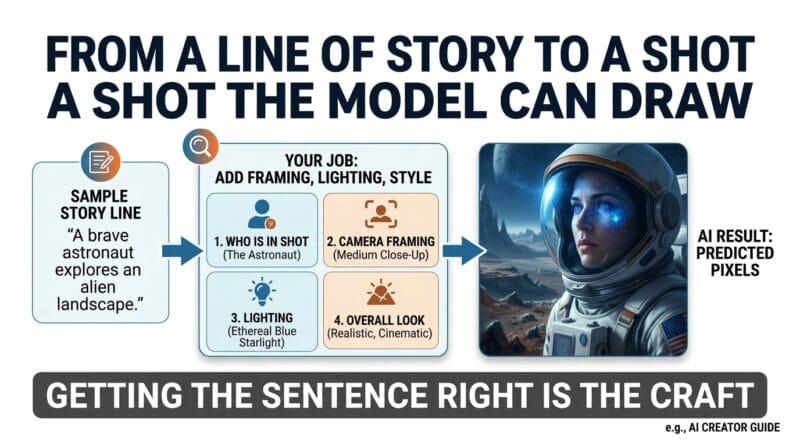
🔴 From a line of story to a shot the model can draw
An AI image or video model does not read a story the way you do. It converts your words into numbers, then predicts the pixels that best match those numbers. So the sentence you write is the entire set of instructions the model receives — there is nothing else to go on. Getting that sentence right is the whole craft here. A clear prompt names four things: who is in the shot, how the camera frames them, what the light is doing, and the overall look. Your story already supplies the who and the what. Your job is to add the framing, the lighting and the style.
🟡 Why keeping the same face is the hard part
Here is the mistake almost every beginner makes. The model has no memory. Each image is generated from a blank start, so nothing from the previous shot carries over on its own. Describe someone as “a tall man in a white shirt” in one prompt and “a man in pale clothing” in the next, and you will get two different people. Two habits fix this:
- A character bible — one fixed, word-for-word description of each person that you paste into every prompt they appear in.
- A negative prompt — a short list of what you do not want, such as extra fingers, a distorted face, text or a watermark. You are telling the model where not to go.
- One moving element per clip — for video, keep the frame still except for a single motion (a flame, mist, a slow push-in). More motion means more drift.
🟢 Long stories, small memory: why we split into parts
A model can only read so much text at once. That limit is called its context window. Paste a 3,000-word story in one go and the model either refuses it or loses the thread halfway through. The working method is to break the story into parts of a few hundred words, generate one part at a time, and carry the character bible forward so part five still knows what everyone looks like. This “split the big job, keep the shared state” pattern is the same idea you meet in programming when a task is too large for a single step.
🔵 A worked example: one sentence, one prompt
Story input: “Ahead, a woman in a white cloth stood facing the water, perfectly still. Nanda called out to her. She did not turn.”
Prompt output:Medium shot, eye level. NANDA (locked look from the bible) stands on a paddy bund at dusk, mouth open, calling out. In the mid-ground a WOMAN in a white cloth (locked look) faces the water, back to camera, perfectly still. Low-key moonlight, mist on the water, muted colours, 16:9. Negative prompt: extra fingers, distorted face, changing clothes, text, watermark.
Notice what changed. Every named element came straight from the story — nothing was invented. The camera choice (medium shot, eye level), the light (moonlight, mist) and the style (muted, 16:9) were added by you. The woman stays a back-to-camera silhouette, which is both truer to the story and far easier for the model to keep stable.
🟡 Common mistakes
- Vague subjects — “a person” instead of the locked character description.
- Re-wording the same character differently in each shot, so their face changes.
- Asking for too much action in one clip, then wondering why the figure warps.
- Skipping the negative prompt, then being surprised by the sixth finger.
- Pasting the whole story at once instead of generating it part by part.
🟢 Honest limits
- AI still slips on hands, small text and faces — check every frame yourself.
- Long spoken lines rarely lip-sync cleanly with today’s video tools.
- Even with a character bible, exact consistency is not guaranteed; expect small drift between shots.
- Generation runs on your own API key, so the provider’s cost and rate limits apply.
- The method plans and prompts — it does not replace a human eye for story, pacing and taste.
If you study ICT or Computer Science, this lives inside the AI and multimedia units. SL O/L and A/L ICT, Cambridge 9618, and AP Computer Science Principles all ask you to explain how an AI system takes an input, processes it, and returns an output — and to judge its limits. Writing prompts is a hands-on way to watch that input-process-output pipeline for yourself. For a wider background, see the overview on Wikipedia’s prompt engineering page. To try the ideas here, open the AI Story-to-Storyboard Generator , and for a manual, no-key way to build single shots by hand, pair it with the Cinematic Prompt Studio . For the theory of how a model turns words into an image, see our companion article on how generative AI works .
Last updated: September 2026
🟢 What it actually is
Prompt engineering is the skill of writing a plain-language instruction so an AI model paints the picture you had in your head — not a random one near it. The story tells you who and what; you add the framing, the light and the style.
🔵 Why structure beats length
A long, messy prompt drifts. A short, ordered one holds. Naming the character the same way every time, plus a “do not draw this” list, is what keeps a face and a costume steady from shot one to shot forty.
🟣 Where you meet it
Film pre-visualisation, advertising storyboards, game concept art, and classroom multimedia projects all rely on the same idea: describe a shot precisely enough that a machine can produce it and reproduce it.
🤔 Frequently asked questions
What is prompt engineering in one sentence?
It is writing your instruction to an AI model clearly enough that the output matches your intent, then reusing that wording so results stay consistent.
Why does the character’s face change between images?
The model has no memory between images. Unless you paste the same fixed description each time, it invents a new look for every shot.
What is a negative prompt?
A short list of things you do not want in the picture — extra fingers, a warped face, text, a watermark. It steers the model away from common errors.
Why split a long story into parts?
A model can only read a limited amount of text at once (its context window). Smaller parts, generated one at a time with the character bible carried forward, keep the results accurate.
Do I need to know coding to write good prompts?
No. Prompts are written in plain language. Knowing a little about how models process input helps, but the real skill is clear, ordered description.
What is a character bible?
A single locked description of each character — features, hair, clothing, build — that you copy word for word into every prompt they appear in, so they stay recognisable.
Can AI fully replace a storyboard artist?
Not today. It speeds up drafting and keeps shots consistent, but it still needs a person to judge story, framing and quality, and to fix its errors.
Which exam topics does this connect to?
The AI and multimedia units of SL O/L and A/L ICT, Cambridge 9618, and AP CSP — especially explaining the input-process-output flow of an AI system and its limitations.


Leave a Reply