

- How does a DBMS help create relationships between tables?
- What is the purpose of a form in a database, and how can a delete button enhance it?
- What is a query, and how can sorting be applied to it?
- How does the Report Wizard assist in creating database reports?
- Why is printing a report useful in a database system?
Ruwan Suraweera Changed status to publish
Answers and Descriptions:
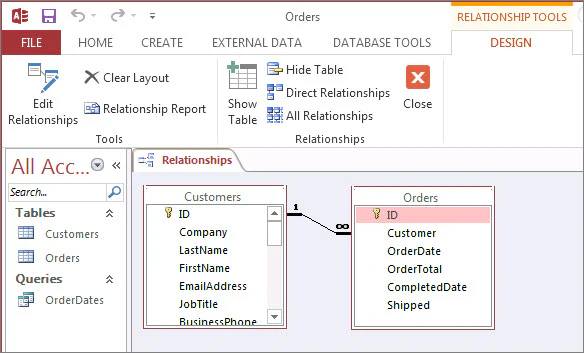
- Answer: A DBMS (Database Management System) allows users to define primary and foreign keys and link tables through a relationship tool, ensuring data connectivity.
Description: In software like Microsoft Access, you can drag a primary key (e.g., “Student ID”) to a foreign key in another table to establish a link, making data retrieval easier. - Answer: A form provides a user-friendly interface to view and edit data. A delete button allows users to remove records directly from the form.
Description: Instead of editing raw tables, a form simplifies data entry. Adding a delete button lets a teacher remove a student’s record without navigating complex menus. - Answer: A query retrieves specific data from a database based on criteria (e.g., “all students above age 15”). Sorting arranges the results (e.g., alphabetically by name).
Description: Queries filter data for analysis. Sorting by name in the example above makes it easier to read the list of students. - Answer: The Report Wizard guides users through selecting data, formatting, and layout options to generate a printable report.
Description: For example, a teacher can use the wizard to create a report listing student grades, choosing fields like “Name” and “Grade” and formatting it for printing. - Answer: Printing a report provides a physical or shareable summary of data, such as student performance, for meetings or records.
Description: A printed report of class attendance can be handed out or filed, making it more practical than viewing data on-screen.
Ruwan Suraweera Changed status to publish